.png)
As more companies go multi-cloud, teams quickly discover that flexibility comes with a catch. Every cloud speaks a slightly different financial language. As you distribute workloads across AWS, Azure, and Google Cloud, they also inherit three different pricing models, spread across commitment systems, and billing conventions. The result is a fragmented view of spend that makes optimization far more challenging than in a single-cloud environment.
FinOps teams are feeling that pressure. The FinOps Foundation’s 2025 State of FinOps Report shows that workload optimization and waste reduction remain the number-one priority for more than half of practitioners, signaling that cloud waste is still widespread despite years of tooling and awareness. That’s where a disciplined multi-cloud cost optimization approach becomes essential.
This guide breaks down the foundation of how multi-cloud pricing works, why costs sprawl so quickly, and the best practices FinOps teams rely on to control spend across AWS, Azure, and GCP. By the end, you’ll have a structured playbook for reducing waste, and building multi-cloud cost optimization that scales.
Introducing multiple cloud providers naturally adds a new layer of complexity to your organization. Each cloud option (AWS, Azure, and Google Cloud) comes with its own pricing engine, commitment models, billing structures, and discount mechanisms. Put them together, and you’re suddenly juggling three completely different ways of understanding cost. When these differences collide, even mature FinOps teams struggle to maintain clarity and control. Here’s why.
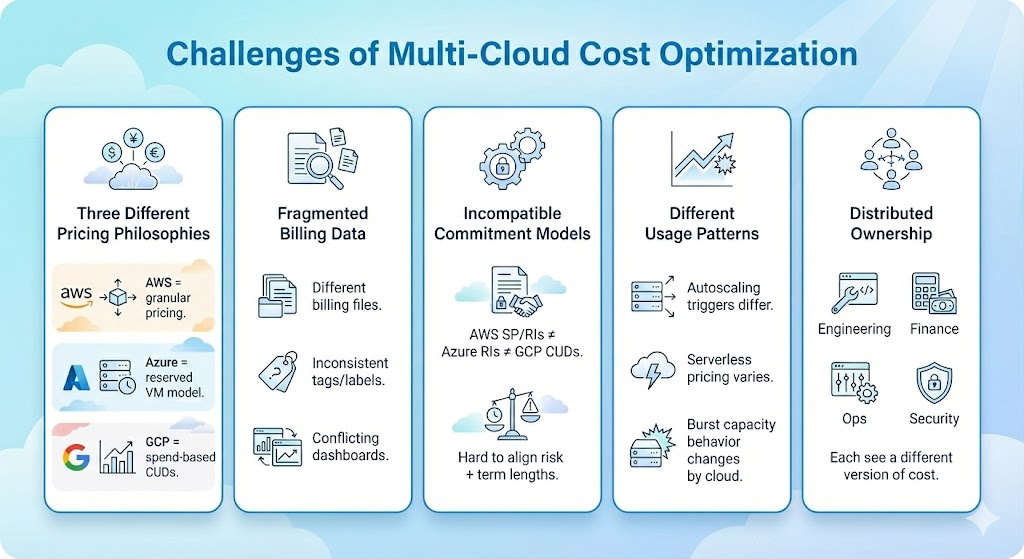
AWS bills primarily through granular metering and long-term commitment discounts like Savings Plans and Reserved Instances. Azure relies heavily on Reserved VM Instances with exchange rules but more rigid configurations. GCP uses Committed Use Discounts (CUDs) with a unique spend-based model.
Even when two workloads look identical, the cost dynamics behind them rarely are. This makes cross-cloud comparison and forecasting far more difficult.
Most organizations receive separate billing files, multiple sets of cost allocation tags or labels, and different dashboards. This leads to a few common issues:
These gaps make it hard to answer foundational questions like “What are we actually spending per team?” or “Which workload is driving cost spikes?”
A commitment strategy that works well in AWS may fail in GCP. Without a unified view of workload stability, teams may either under-commit to avoid risk or over-commit and absorb unnecessary costs.
Learn More: How to Choose Between 1-Year and 3-Year AWS Commitments
Each cloud has its own behavior when it comes to workload patterns. Autoscaling rules may trigger differently, serverless pricing may vary by provider, and platforms handle burst capacity or ephemeral workloads in their own way. Because these patterns rarely line up from one cloud to another, your usage trends can look inconsistent. And unless you normalize those signals, your forecasts end up guessing instead of predicting.
In most multi-cloud organizations, cost ownership is spread across several teams. For example, engineering deploys resources, finance tracks budgets and spending trends, operations manages reliability, and security governs access and compliance. FinOps sits in the middle trying to create a unified cost strategy. The result is fragmented decision-making and no single, consistent optimization strategy that works across all providers.
Commitments are the single most powerful savings mechanism in the cloud, often delivering 20–70% off compute and database costs. But they are also the easiest place to make expensive mistakes, especially in a multi-cloud environment where each provider’s commitment model behaves differently.
Understanding how these commitments work and how they differ is essential before building a multi-cloud cost optimization plan.
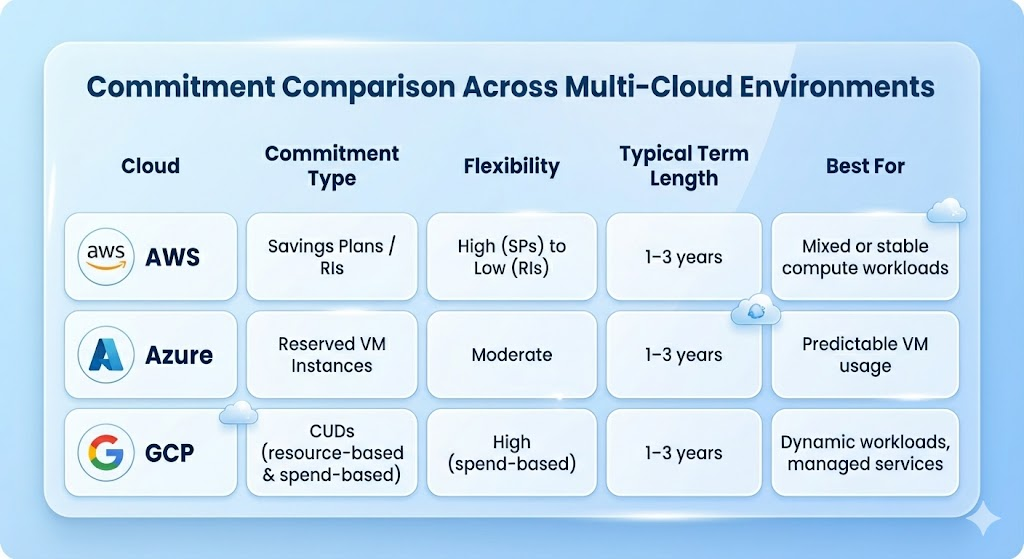
AWS offers the broadest range of commitment options, and they form the foundation of most AWS optimization strategies.
Azure’s commitment model is more rigid but straightforward. Reserved VM Instances allow you to reserve specific VM instances for 1 or 3 years to receive discounts.
Azure RIs can be exchanged in some circumstances if workload needs shift, but they still lack the broad flexibility of AWS Savings Plans. Azure also uses an enterprise-style subscription model, which impacts how budgets and cost allocation are structured.
Google Cloud takes a different approach with Committed Use Discounts, offering two models. Resource-based CUDs commit to specific vCPU and RAM amounts, while spend-based CUDs commit to a monthly spend for services like BigQuery or Cloud SQL.
Spend-based CUDs are the most flexible of the three clouds because they allow Google to apply discounts automatically across qualifying services. However, workload variability can still introduce risk if usage dips below the committed amount.
Across every industry, multi-cloud organizations share the same pattern, which is they commit far less than they should. Not because they don’t understand commitments and the 20–70% discounts that come with it. The real issue is risk perception. Teams are afraid of making the wrong commitment and absorbing the cost of underutilization, so they default to on-demand pricing far more than necessary.
In a single cloud, this caution is already expensive. In a multi-cloud environment, it becomes a multiplier across three clouds, three commitment models, and three forecasting uncertainties. Without a unified view of workload stability across platforms, teams consistently underestimate how much they can safely commit.
Another driver of under-commitment is data latency. Native cloud tools often refresh recommendations every few days, sometimes longer. By the time teams receive updated signals on usage patterns, the opportunity to purchase an optimal commitment may have already passed.
Multi-cloud organizations feel this even more acutely because each cloud surfaces recommendations on its own cadence, and with its own logic, leaving FinOps teams to reconcile fragmented insights.
Optimizing costs across multiple cloud providers requires a framework that brings consistency to environments that were never designed to work together. The teams that succeed are the ones who apply a unified set of practices that normalize cloud behavior, and make costs predictable across AWS, Azure, and GCP.
Below are the core practices that define mature multi-cloud FinOps operations.
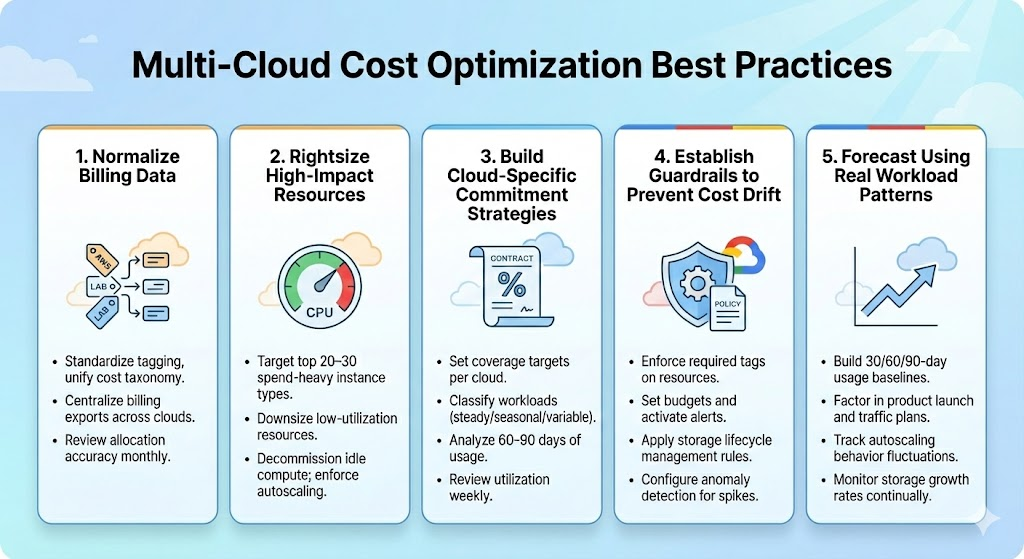
If each cloud reports cost differently, you cannot forecast, commit, or optimize consistently. Normalization turns three incompatible billing systems into a single source of truth you can actually act on. Here’s what you can do:
Most multi-cloud waste comes from oversized or idle compute, databases, and storage. Rightsizing works only when it focuses on the resources that materially impact cost, and not on scattered cleanup tasks that don’t move the needle. Here’s what you can do:
Commitments are the biggest source of savings, but each cloud has different rules, flexibilities, and risks. A one-size-fits-all commitment strategy will fail in multi-cloud. Here’s what you can do:
In multi-cloud environments, spend drifts quickly when new resources are created without standards or lifecycle policies. Guardrails ensure that cost hygiene stays consistent even as teams scale. Here’s what you can do:
Accurate commitment and rightsizing decisions depend on understanding workload behavior. Multi-cloud environments amplify variability, so forecasting must be grounded in actual usage signals. Here’s what you can do:
Each cloud has its own rules, discount mechanics, lock-in periods, and risk profile. And no team, no matter how experienced, can manually forecast three clouds’ workload patterns with the accuracy needed to commit confidently every time.
That’s where Usage AI fits.
Usage AI is a cloud cost optimization platform that handles the part of optimization teams struggle with manually:
Instead of penalizing teams for getting commitments “wrong,” Usage.ai absorbs the downside risk by offering real cashbacks (not credits) when usage dips. This makes commitments feel less like a gamble and more like a strategy.
Here’s what the platform actually does:
Instead of relying on 7-day-old native recommendations, Usage.ai refreshes data every 24 hours, constantly recalculating the safest commitment opportunities.
Teams approve the buy, and Usage.ai handles the procurement of Savings Plans, Reserved Instances, or equivalent Flex Commitments ensuring organizations capture discounts at the exact moment usage supports it.
For workloads that are stable but not perfectly predictable, Usage.ai provides Flex Commitments, which are discounts similar to AWS SPs or RIs without requiring customers to take on long-term risk.
If a commitment is underutilized, Usage.ai pays real cashback to cover the gap. This lets teams commit more aggressively without worrying about over-buying.
Usage AI only charges a percentage of the savings it actually delivers meaning organizations pay nothing unless they save. This fundamentally removes the operational burden and financial risk of managing commitments across multi-cloud systems.
Multi-cloud environments give organizations flexibility, resilience, and access to best-of-breed services, but they also introduce cost complexity that can’t be solved with one-off cleanups or isolated optimization tasks.
The teams that succeed are the ones that normalize their cost data, and commit with confidence. When they reach the point where manual commitment decisions become the bottleneck, platforms like Usage.ai help stabilize the process by automating analysis, securing discounts, and reducing risk through cashback protection. That combination of discipline and automation is ultimately what turns multi-cloud cost optimization from an ongoing struggle into a sustainable practice.
1. What is multi-cloud cost optimization?
Multi-cloud cost optimization is the process of managing and reducing spend across AWS, Azure, and GCP. The goal is to create consistent cost visibility and predictable savings across all cloud environments.
2. Why do companies overspend in multi-cloud environments?
Overspend happens because each cloud uses different pricing, billing formats, and commitment structures. This inconsistency makes forecasting harder, leading teams to under-commit and default to expensive on-demand rates.
3. How do commitment programs differ between AWS, Azure, and GCP?
AWS offers Savings Plans and Reserved Instances, Azure uses Reserved VM Instances, and GCP uses Committed Use Discounts. They vary in flexibility, term length, and risk.
4. What are the most effective ways to reduce multi-cloud cloud costs?
Start by normalizing cost data across providers, enforcing consistent tagging, and rightsizing top spend drivers. Then set commitment coverage targets for each cloud and implement guardrails like budgets, lifecycle policies, and anomaly detection to prevent cost drift.
5. How does Usage.ai help with multi-cloud cost optimization?
Usage.ai analyzes AWS, Azure, and GCP usage daily, recommends and automates commitment purchases, and provides cashback when commitments are underutilized. This reduces financial risk and helps teams achieve higher, safer commitment coverage across clouds.
Share this post


.svg)

.png)
.png)