.png)

If you're running multiple AWS accounts under one organization, here's something worth knowing. A Savings Plan purchased in one account is already covering usage in your other accounts. That's not a configuration you set up, but it is actually how AWS consolidated billing works by default.
For most teams, this is good news. One purchase, org-wide coverage, AWS handles the allocation automatically. The discount flows to wherever it generates the most savings across your accounts.
The part that gets complicated is everything that happens next. Which account gets priority? What if you need to restrict sharing for a specific team's chargeback requirements? What happens to your coverage when an account moves between organizations? And how do you actually see which accounts are consuming a shared Savings Plan? The default console view won't tell you that cleanly.
This guide answers all of it. We'll cover how the sharing mechanics work, the four modes you can operate in, the utilization visibility problem that consolidated billing creates, and the specific scenarios where the default behavior stops delivering the savings you're expecting.
AWS Organizations uses consolidated billing to merge the usage and payments from all member accounts into a single bill, processed through the management account (formerly called the master account).
The management account pays the total charge. Each member account still generates its own usage data, but discounts, including Savings Plans, Reserved Instances, and volume pricing are calculated across the aggregate.
Consolidated billing is feature of AWS Organizations that rolls up billing from multiple AWS accounts into one payment, calculated against the combined usage of all member accounts. This pooled usage model enables commitment discounts to apply across account boundaries.

Here’s how the key operational implication looks like. A Savings Plan purchased in Account A will automatically discount usage in Account B, C, and D unless sharing is explicitly restricted.
Also read: AWS Savings Plan: A Complete Guide to Maximizing Savings
The application sequence follows a strict priority order.
Step 1: Owner account first. The Savings Plan is applied against the usage of the account that purchased it. This happens before any cross-account sharing occurs.
Step 2: Spillover to the organization. Any unused commitment or the portion not consumed by the purchasing account in a given hour is automatically shared with other accounts in the organization.
Step 3: Maximum savings optimization. AWS applies the remaining commitment to whichever account's usage yields the largest calculated savings, not on a first-come basis.
This means a Savings Plan purchased in a low-usage account can, in practice, provide most of its discount value to high-usage accounts. That is by design. The risk is if the high-usage accounts are not in the same organization, or if sharing has been restricted, that commitment sits partially unused.
.png)
Note: Verify current behavior at amazon docs as rules can change.
AWS supports four distinct sharing configurations, introduced with RI/SP Group Sharing (managed via AWS Cost Categories). Understanding which mode you are operating in determines how flexible or rigid your discount allocation is.
RISP Group Sharing is a feature in AWS Cost Categories that allows the management account to define subsets of accounts within the organization and restrict Savings Plans discount sharing to those subsets, enabling chargeback-aligned cost allocation without losing discount efficiency within the group.
Also read: AWS Savings Plan Buying Strategy: Layering, Timing & Right-Sizing Commitment
The management account can disable Savings Plans sharing for any individual member account. Two things happen when sharing is deactivated for an account:
Deactivation is the right choice in specific scenarios, like reseller or MSP models where discount allocation must stay per-tenant, regulatory separation requirements, or internal chargeback models that need clean per-account P&L. Outside those cases, deactivating sharing reduces the organization's aggregate utilization rate and increases total cloud spend.
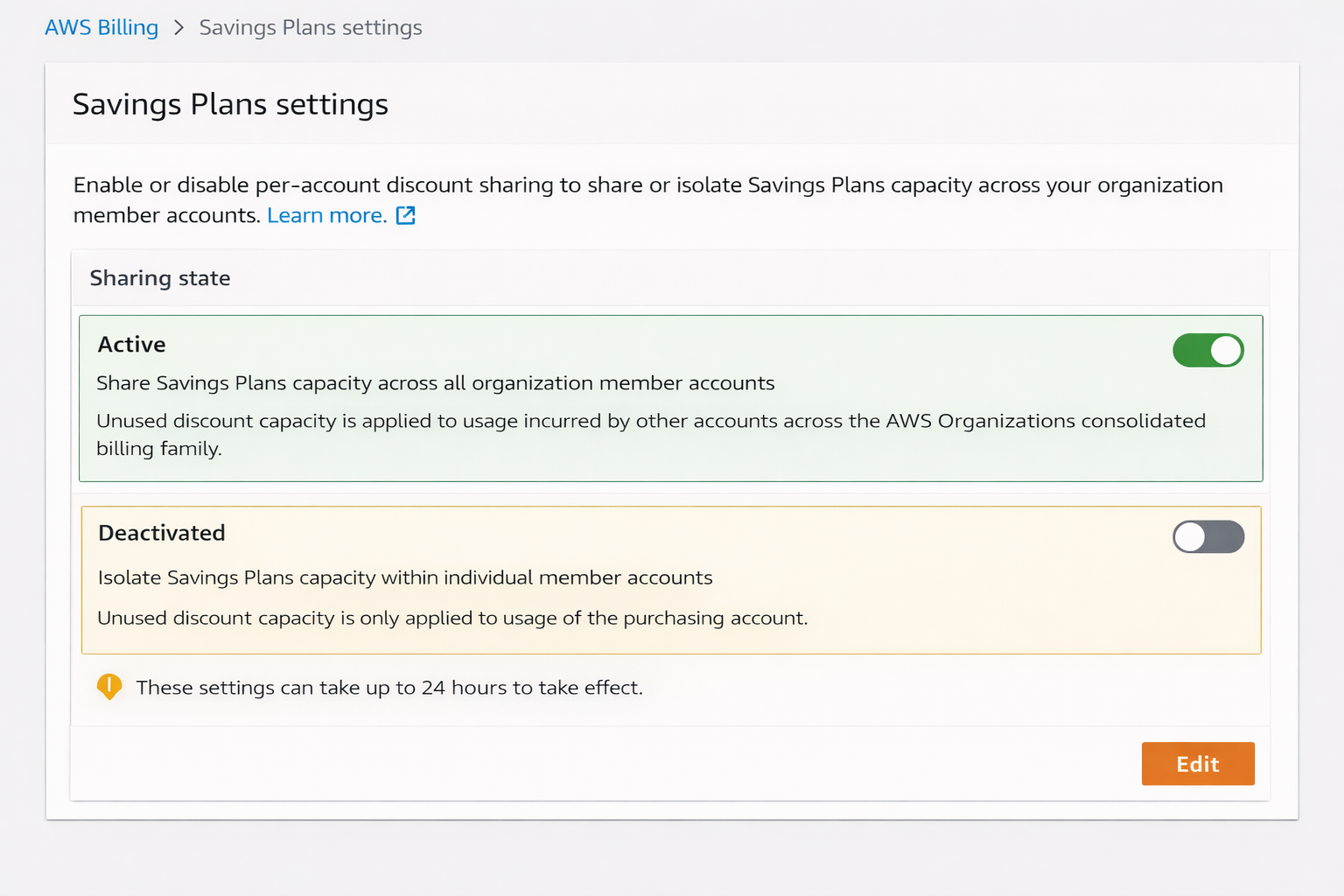
What happens to the bill when sharing is turned off?
The management account's consolidated bill does not change in total aggregation, but the discount line items shift. The deactivated account shows higher effective spend. Other accounts absorb whatever surplus commitment exists from the rest of the organization.
This is where most engineering teams run into operational problems. AWS Savings Plans utilization is reported at the purchasing account level by default in the console. Under consolidated billing, the "utilization %" shown for a given Savings Plan reflects all usage covered across the entire organization and not just the purchasing account.
That means a plan showing 95% utilization could be covering usage from four different accounts. If one of those accounts changes its compute footprint significantly, utilization drops and you will not immediately know which account drove the change from the top-level Savings Plans console view.
To get per-account utilization attribution under consolidated billing, you need:
The refresh delay in Cost Explorer is a real operational risk at scale. AWS Cost Explorer's Savings Plans data can be 24–72 hours behind actual usage patterns. For a multi-account organization running $50K+/month in on-demand compute, a 72-hour blind spot on utilization shifts translates to 3 days of undetected waste compounding before any recommendation engine can respond.
Also read: Understanding Savings Plan Amortized Cost in AWS Cost Explorer
This is among the most common questions in multi-account AWS Organizations, and the answer depends on the organizational structure more than the technical mechanics.
Purchase in a central payer / linked account designated for commitments when: You have a large, complex organization and want to centralize commitment management without using the management account for financial instruments. This is a common FinOps pattern at enterprise scale.
Sharing is enabled by default. The management account can modify sharing settings at any time from the Billing and Cost Management console.
To disable sharing for a specific member account:
To re-enable sharing, follow the same path and toggle Discount sharing back on. There is no penalty or waiting period for re-enabling.
Changes to sharing settings do not retroactively affect past billing periods. They apply from the next hourly calculation cycle forward.
Note: Verify the exact console path at amazon aws account billing as UI paths change with console updates
Mistake 1: Purchasing Savings Plans in a member account that will be deactivated from sharing. If that account is later isolated (for chargeback, compliance, or org restructuring), any surplus commitment becomes siloed waste.
Mistake 2: Assuming utilization percentages reflect a single account. The org-level utilization number in the Savings Plans console aggregates all covered usage. A team reporting "98% utilization" may have three accounts contributing and a fourth account that just scaled down but is being masked by the aggregate.
Mistake 3: Not monitoring utilization per account after org changes. Mergers, acquisitions, and team restructuring in AWS Organizations frequently trigger account moves. When an account leaves the organization or moves to a different payer, any Savings Plans it was relying on for shared discounts immediately stop applying. The account reverts to on-demand pricing.
Mistake 4: Setting Restricted sharing mode without modeling the utilization impact. Restricting sharing to a group captures discounts for a defined team but eliminates spillover efficiency. If the group's usage drops below the committed amount, the waste is trapped inside the group rather than being absorbed by the rest of the org.
Also read: 10 Biggest Cloud Cost Optimization Challenges (and How to Solve Them)
The core operational challenge with Savings Plans under consolidated billing is its continuous optimization across accounts that have different usage patterns, different growth rates, and different chargeback requirements.
AWS Cost Explorer refreshes Savings Plans recommendations every 24–72 hours. In a 10-account organization where three accounts have materially different usage week-over-week, that refresh lag means commitment sizing decisions are being made on data that is up to 3 days old. At a conservative $6–12K/day in uncovered on-demand spend per account, a 72-hour refresh cycle can represent $18K–$36K in avoidable spend per recommendation cycle per account.
Usage.ai refreshes commitment recommendations every 24 hours. That is a 3-day advantage over AWS native tooling. For a multi-account organization running significant on-demand compute, that gap is a measurable dollar amount, not a feature description.
Multi-Org Reporting and Showback Support: Usage.ai's platform provides visibility across all linked accounts in the organization, giving FinOps teams per-account attribution without requiring manual CUR queries or custom Athena pipelines. This is the tooling gap that the consolidated billing sharing model creates and that AWS's native reporting does not close cleanly.
Cashback protection on underutilized commitments. When Savings Plans sharing is restricted, modified, or disrupted by org changes, underutilized commitment becomes waste under the traditional model. Usage.ai's cashback guarantee means that if a commitment purchased through the platform is underutilized, customers receive cashback or credits.
Customers like EVGo (NASDAQ: EVGO) have achieved $5.2M in annual savings, and Motive has realized $2.3M annually, both in AWS-heavy environments where multi-account commitment management was a core challenge.
If you're managing Savings Plans across multiple accounts and want to see exactly where your commitment dollars are going and where they're leaking, Usage.ai can show you in 15 minutes. Book a free savings assessment.
1. What is consolidated billing in AWS, and how does it affect Savings Plans?
Consolidated billing is an AWS Organizations feature that aggregates usage and payments from all member accounts into a single bill paid by the management account. For Savings Plans, this means discounts purchased in any account automatically apply to eligible usage across the entire organization. The purchasing account gets priority, then surplus commitment spills over to other accounts to maximize total savings.
2. Can a member account use Savings Plans purchased by another account?
Yes. By default, AWS automatically shares any unused Savings Plans commitment from the purchasing account to other member accounts in the same organization. AWS applies the shared commitment to whichever account's usage generates the largest savings. This behavior is enabled automatically under consolidated billing and requires no additional configuration.
3. What happens if I turn off Savings Plans sharing for an account?
If the management account disables sharing for a member account, that account's Savings Plans apply only to its own usage. It cannot share outward, and it cannot receive inbound discounts from other accounts. Turning off sharing reduces the organization's total utilization efficiency and can cause unused commitment to go to waste if the isolated account's usage is lower than its purchased commitment amount.
4. Which account should purchase Savings Plans in an AWS Organization?
For maximum discount coverage, purchase in the management account or a central commitment account, the discount will spill over to all member accounts automatically. For chargeback or team-level P&L attribution, purchase in the specific member account so the savings are attributed there before any spillover. In MSP or reseller models with tenant isolation, purchase in the tenant account and deactivate sharing to prevent cross-tenant discount bleed.
5. How do I see which accounts are consuming my organization's shared Savings Plans?
The default Savings Plans console shows aggregate utilization, not per-account breakdown. To get per-account attribution, use AWS Cost and Usage Reports (CUR) and query the savingsPlanEffectiveCost column filtered by lineItem/UsageAccountId. Alternatively, use AWS Cost Explorer's Savings Plans Utilization report with the "Group by: Linked Account" filter applied.
6. What is RISP Group Sharing, and when should I use it?
RISP Group Sharing (RI/SP Group Sharing) is a feature in AWS Cost Categories that lets the management account define subsets of accounts and restrict Savings Plans discounts to sharing within those subsets only. Use it when you have distinct business units with separate budgets that need clean cost boundaries, or when an MSP needs per-tenant isolation. Setting Restricted mode means unused commitment stays within the group and does not spill to the rest of the organization, so model the utilization impact before enabling it.
7. Does moving an account between AWS Organizations affect its Savings Plans coverage?
Yes, immediately. When an account leaves an organization or moves to a different payer, all cross-account Savings Plans sharing stops for that account as of the next billing calculation cycle. The account reverts to on-demand pricing for usage that was previously covered by shared organizational commitments. Any Savings Plans it owned also stop applying to accounts in the previous organization. Plan organization restructuring around commitment term expirations where possible to avoid mid-term coverage gaps.
8. What is the difference between AWS Savings Plans and Reserved Instances under consolidated billing?
Both Savings Plans and Reserved Instances share across accounts in a consolidated billing family by the same default mechanism, i.e., purchasing account priority, then org-wide spillover. The key practical difference is scope: Savings Plans apply based on compute spend type (EC2, Fargate, Lambda, RDS etc.), while Reserved Instances apply to specific instance configurations (family, region, OS). This makes Savings Plans more flexible for organizations where account-level instance types vary widely. Both can have sharing deactivated per account by the management account.
Share this post


.svg)
.svg)

